









How to Kill an Hour
  • How To Kill An Hour
  • BLOG
  • PODCAST
  • CONTACT
  • Merch
  • Menu Menu

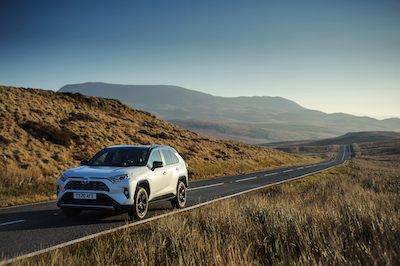
Toyota RAV4 Hybrid

16th August 2020/in Gadgets / Tech/by billywright
PreviousNext
1234567891011121314

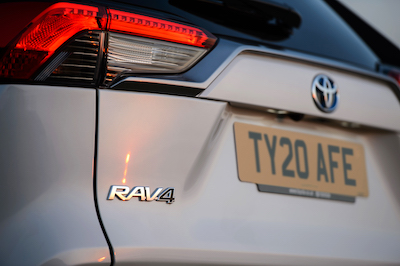
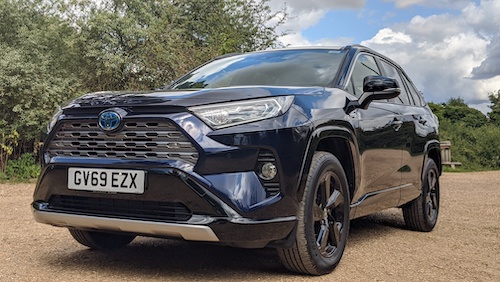
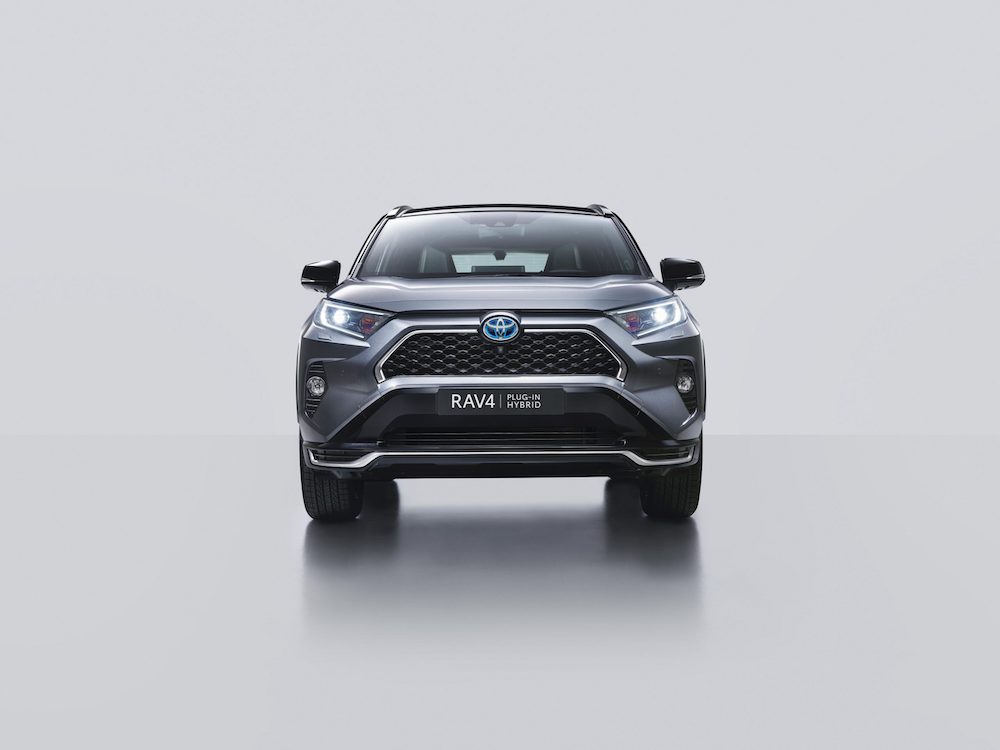
Toyota have released a brand new hybrid car, the Toyota RAV4 Hybrid! Way back in 1994, Toyota launched the original RAV4. This brought with it a new kind of car that could go anywhere and it had the rugged stance of an SUV. While it had the compact look of a hatchback. It made it’s own lane.

This spirit is also witnessed in this brand new version of the RAV4,  the fifth generation of the RAV4. It brings with it a brand new era of performance, capability and safety. Furthermore the advances are underpinned by the first use of Toyota’s new GA-K platform in an SUV.

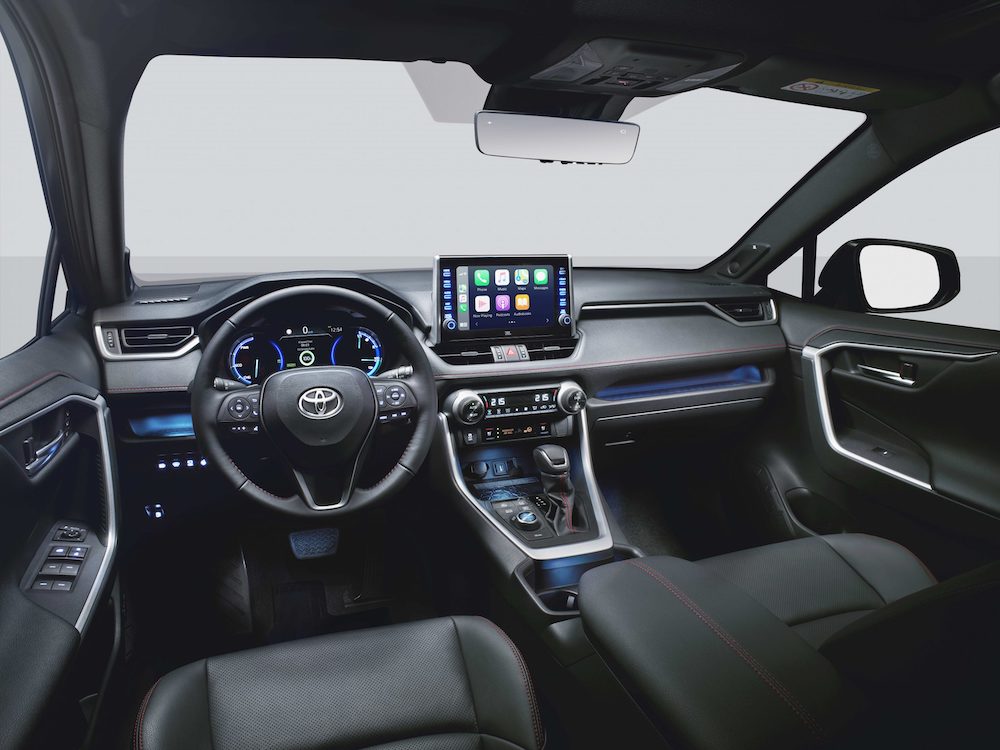
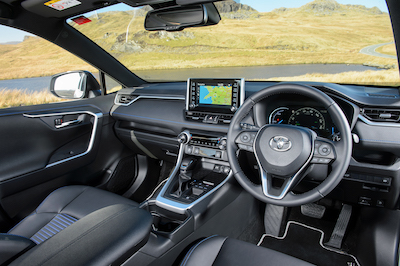
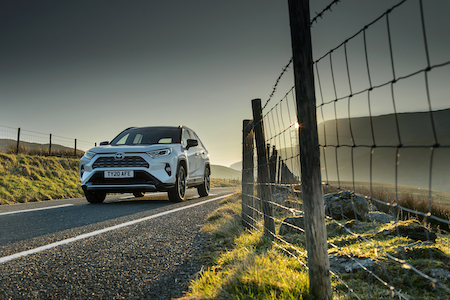
The RAV4 has a low centre of gravity and an increased body rigidity. The new RAV4’s platform has superior handling, ride comfort and spacious interior. It also has an eye catching design with a lower roof/bonnet lines with higher ground clearance. While the cabin has more space and comfort with a fantastic finish throughout.

Power

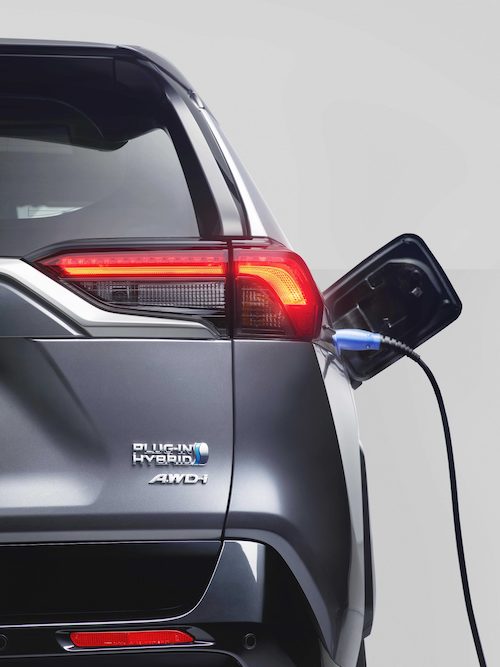
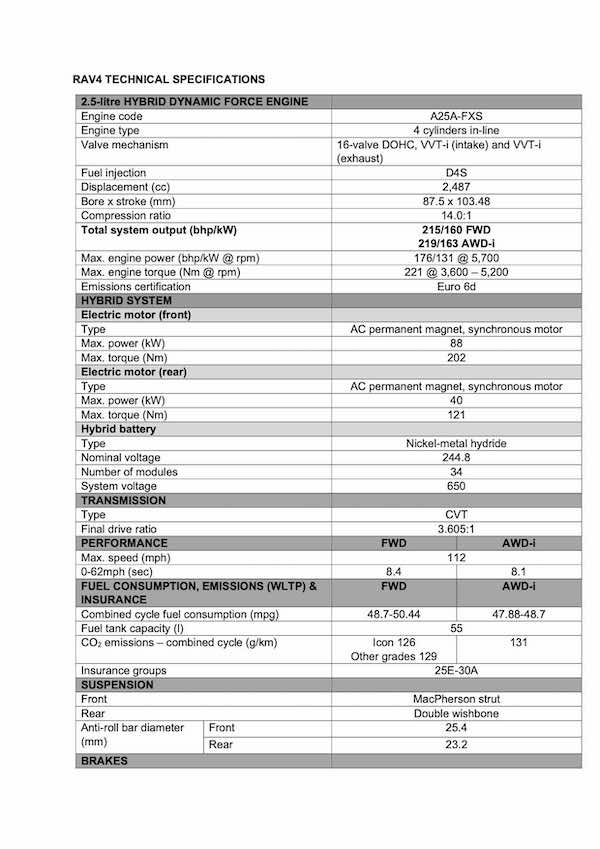
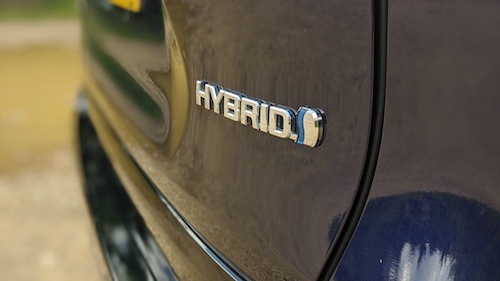
RAV4 offers a self charging and hybrid powertrain, the new 2.5-litre petrol hybrid Dynamic Force engine, offering 215bhp in front-wheel drive form and 219bhp with all-wheel drive. Which in turn brings with it a responsiveness and efficiency with best in class fuel economy and emission levels.

Furthermore the all wheel drive system allows the SUV to “drive on any road”. The hybrid electric AWD-i system has been re- engineered and enhanced to provide much stronger performance in challenging conditions. It also allows for secure handling on slippery surfaces.

Additionally the RAV4 is the first Toyota model to benefit from the Toyota Safety Sense that extend the use of advanced technologies to help prevent accidents. Providing greater driver assistance and a degree of automated driving functionality.

TOYOTA NEW GLOBAL ARCHITECTURE GA-K PLATFORM

The foundation of the new RAV4’s dynamic qualities is the all-new TNGA GA-K platform.

This allows the car to have the strength of a low centre of gravity, lightweight and a strong, rigid and balanced chassis that delivers exceptional handling, stability and driver rewards.

This gives a really fun drive and enables a great design, both inside and outside of the car. Furthermore it brings with it an enhanced safety performance and comfort for everyone.

Every component has been made lighter and located lower down in the vehicle. Even the engine and the seats. Brining with it an incredibly low center of gravity. The platform brings with it a 57% increase in the body rigidity. This allows for a stable flat ride with incredible handling.

The GA-K platform defines the “confident and natural” driving quality that Toyota has sought for this new model. A confident driving feeling is due to the car not reacting adversely to disturbances and communicating a sense of stability. Natural driving feelins is due to the car reacting naturally to what the driver is doing.

CONCEPT AND DESIGN

The TNGA GA-K platform was beneficial to the designers of the new RAV4, as they wanted to give the SUV a strong character and style which helped to set it apart from other models in the SUV market.

Many standardised parts that have been implemented “under the skin” has helped to simplify the development process. This helped to give designers more time to create the look both inside and out.

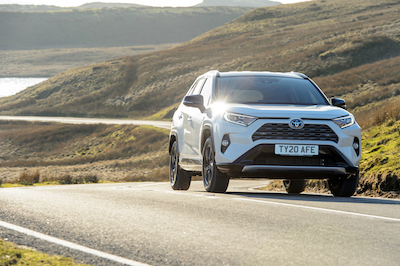
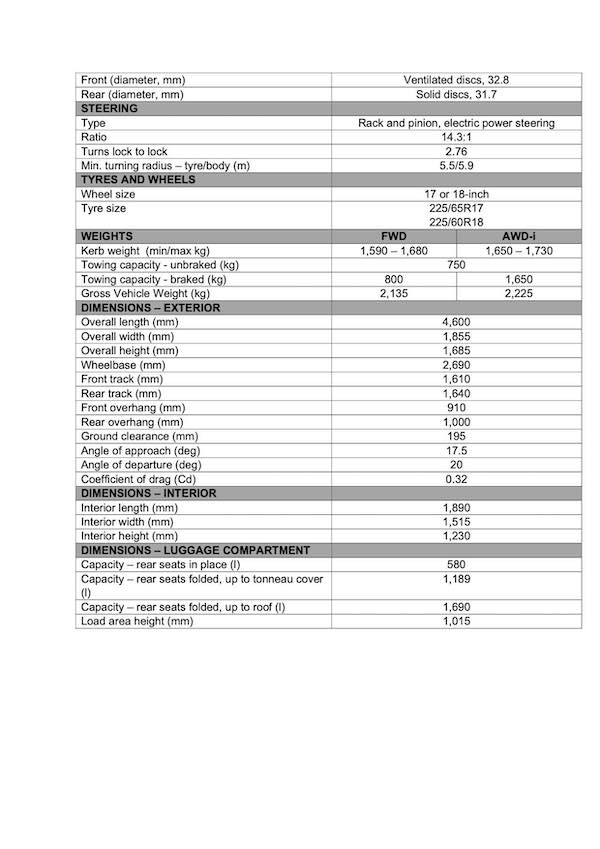
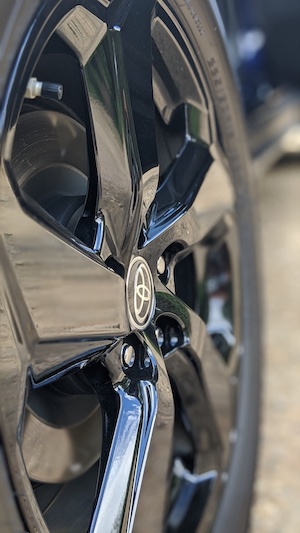
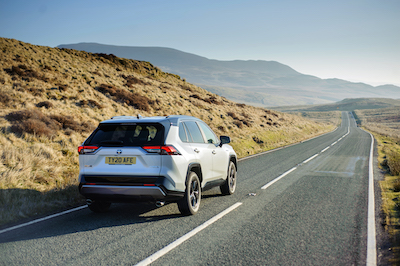
The impactful look of the new RAV4 is helped by raising the ground clearance and using large diameter wheels (up to 18inch) which helps to make the car suitable whatever the use.

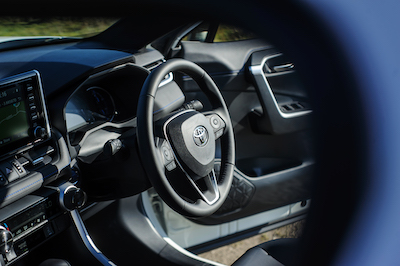
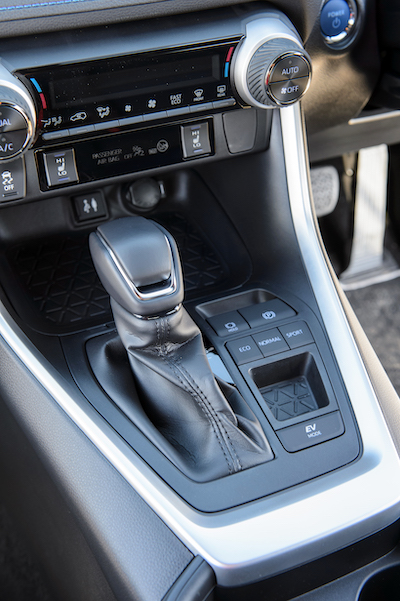
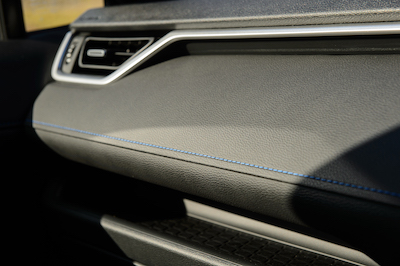
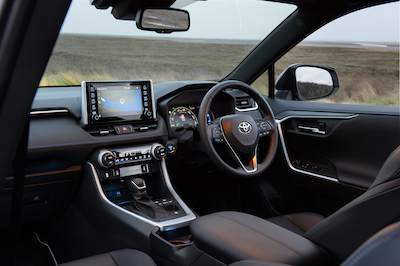
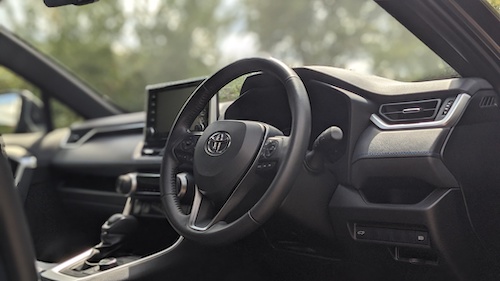
Inside the car is characterised by high sensory quality such as soft touch surfaces on the dashboard and door panels. Switchgear is new, with cleanly integrated buttons and pleasingly tactile controls. For example the button/dial to adjust the air conditioning.

POWERTRAINS AND PERFORMANCE

The Toyota RAV4 Hybrid is a brand new 2.5L Hybrid Dynamic force engine. It combines fuel and emissions efficiency with a quiet operation and more power and greater responsiveness.

The full system maximum output of 219bhp/163 kW in the all-wheel drive model (215bhp/160 kW with front-wheel drive) compares to 195bhp/145kW for the fourth generation model. The SUV can also accelerate from rest to 62mph takes just 8.1 seconds (FWD model).

The self charging hybrid system used in the RAV4 is the 4th generation of the tech and will deliver multiple benefits. The power control unit and the nickel-metal hydride battery are now more compact and lighter in weight. The transaxle and transmission have also been engineered to reduce electrical and mechanical losses. The battery in the RAV4 is also 11% lighter and transmission losses are reduced by 25%.

The new 4th generation system also makes great use of the new 2.5l Hybrid Dynamic Force engine, allowing for fuel consumption and emissions that is best in class.

Performance has been improved with better acceleration from stationary, improved efficiency at higher speeds, overall smoother and more linear acceleration and better control when decelerating.

INTELLIGENT ALL-WHEEL DRIVE (AWD-i)

Toyota is also improving it’s AWD-i (Intelligent all wheel drive technology) to deliver enhanced performance, capabilities and control in all driving conditions.  Allowing to set itself apart as it has impressive on and off road performance. As it has fantastic and secure cornering performance and grip in all conditions.

RAV4 Hybrid with significantly enhanced electric AWD-i system

The AWD-i system will help give better fuel economy in urban driving, quieter performance at high speeds and better traction in slippery conditions. The system, compared to mechanical AWD systems is more compact and lighter, which gives a better fuel consumption.

The electric AWD-i system automatically optimises the torque ratio depending on the driving conditions. This will provide improved handling, stability and off-road performance, particularly in faithful line tracing through bends in slippery conditions, giving the driver a strong, confidence-inspiring feeling of all four wheels being in good contact with the road.

AWD Integrated Management

Furthermore the Toyota RAV4’s all wheel drive performance is further improved due to the AWD Integrated Management (AIM). This system will automatically adjusts different vehicle systems. The steering assist, brake and throttle control, shift pattern and drive torque distribution – according to the drive mode selected.

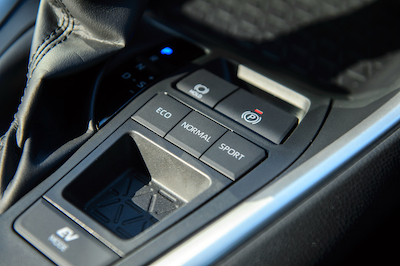
The driver can switch from Normal to Eco or Sport mode. When choosing Sport mode, AIM modifies the steering assist, throttle control shift schedule and drive torque distribution to gain better on-road performance.

Greater “escape” capability with Trail Mode

This new Toyota RAV4 Hybrid is so capable in many different conditions because of the new automatic limited slip differential control, Trail Mode.

Trail Mode helps to ensure best possible grip and control on low grip surfaces. The system will also provide valuable assistance when in challenging off road conditions.

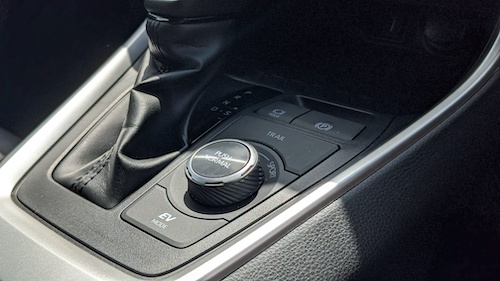
The new Toyota RAV4 Hybrid will, once the Trail Mode has been activated via a button on the centre console. The free rotating wheel (if a wheel has lost contact with the ground on uneven terrain) can be braked and drive torque directed to the grounded wheel. The Throttle control and the transmission shift pattern will be adapted to help the driver keep the vehicle moving.

EQUIPMENT AND NEW TOYOTA SAFETY SENSE SYSTEMS

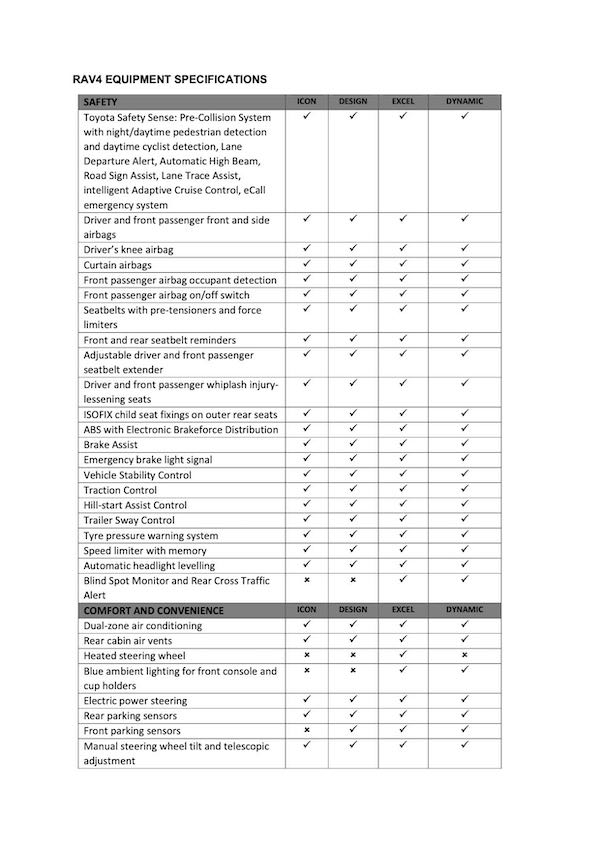
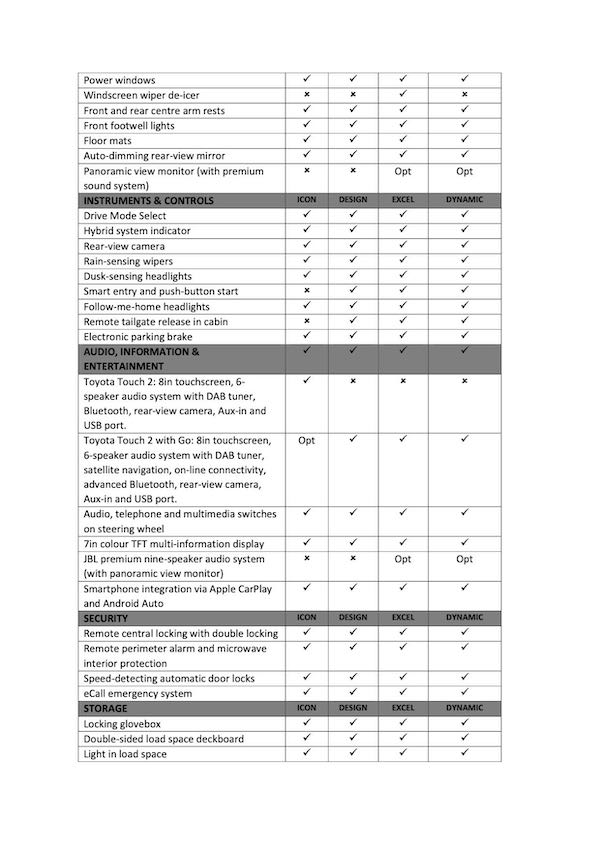
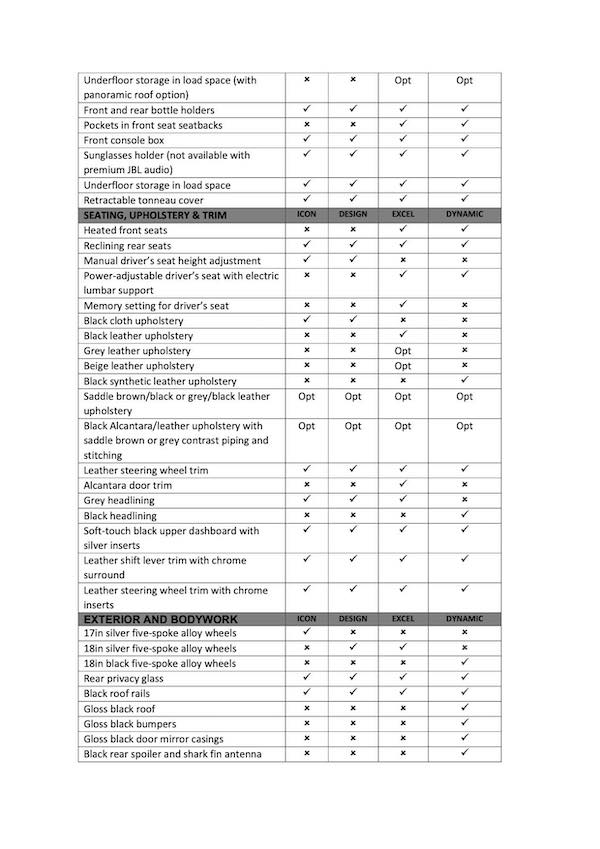
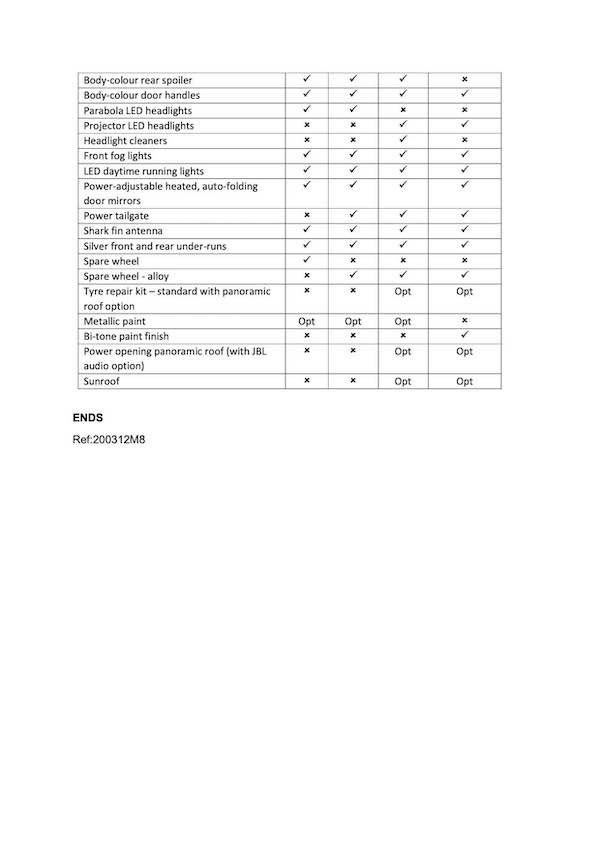
Equipment specifications for the new RAV4 demonstrate how Toyota continues to apply technologies to deliver useful innovations in safety, comfort and everyday practicality.

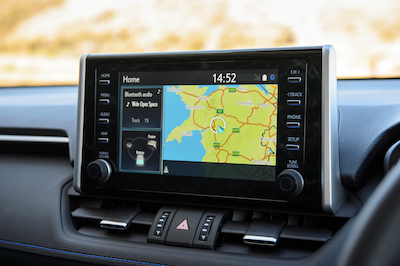
Features that are available as standard or as options, according to model grade, include a power-operated panoramic roof, smartphone integration with Apple CarPlay and Android Auto, heated seats and up to five USB ports around the cabin for the connection or charging of multiple devices.

The new RAV4 offers generous equipment specifications across its range in Europe, with all models equipped as standard with the latest iteration of Toyota Safety Sense and an E call emergency contact function.

Second generation Toyota Safety Sense

Toyota first introduced the Toyota Safety Sense in 2015. To date, more than 10 million new vehicles have benefited from the Toyota Safety Sense. The system helps provide the driver means of avoiding collisions or mitigating the effects of an accident by warning the driver, preparing safety systems for optimum operation and, if necessary, triggering automatic braking or steering assistance.

Toyota have continued to build upon the system and move towards their goal of 0 road accident fatalities and injuries. The second generation of the Toyota Safety Sense is making its debut in all models of the new Toyota RAV4 Hybrid.

It features a single lense camera and millimetre wave radar. These will both expand the scope of hazard detection and functionality. Furthermore the unit has been made smaller, giving the driver a wider field of vision.

Pre-Collision System with Pedestrian Detection

Second generation Toyota Safety Sense includes upgraded versions of the Pre-Collision System with Pedestrian Detection, intelligent Adaptive Cruise Control, Lane Departure Alert with Steering Assist, Road Sign Assist and Automatic High Beam. It also introduces Lane Tracing Assist, which provides more advanced driving support.

The Pre-Collision System as been improved to allow the vehicles to detect pedestrians in low light driving as well as daylight. The system has also added the capability to detect and recognise bicycles in the vehicles path, at various speeds between 6 and 50mph in daylight.

In terms of vehicles the system can determine collision risks at speeds between 0 and 112mph. The vehicle will calculate if a collision is imminent the driver will be alerated and prepare the brakes (Pre-Collision Brake Assist). While if the driver doesn’t act on the warnings, the Autonomous Emergency Braking will trigger. This will reduce the vehicle speed by up to 25mph. Which could potentially stop the car and avoid an impact.

Adaptive Cruise Control System

An all new intelligent Adaptive Cruise Control System can work in conjunction with the Toyota RAV4’s Road Sign Assist System. When the car is travelling at a constant, pre-set speed, iACC can recognise new speed limits on major roads and let the driver adjust the speed to keep within the limit, simply by using switches on the steering wheel. While the system itself has been improved to recognise a wider range of road signs. Presenting the information on the drivers multi-informational display.

The Toyota RAV4 Hybrid has a new Lane Tracing Assist function, this provides the driver with a degree of automated driving support. The system will monitor line markings on motorways and principal routes and apply steering assist to keep the car within it’s lane (when traveling at speeds above 31mph). Allowing to reduce the collision risk and burden on the driver when making long motorway journeys.

Both the Adaptive Cruise Control and Lane Tracing Assist systems work together in slow stopgo traffic to help track the vehicle ahead within the traffic lane. Helping to maintain a safe distance and at speed. While bringing the vehicle to a halt when necessary. Furthermore moving off seamlessly when traffic resumes. Helping to relieve the driver of stress when driving in slow moving traffic. Helping to reduce the risk of low speed rear end collisions.

The Lane Departure Alert and Steering assist has been vastly improved to recognise road margins on straight roads when there is no lane markings. If it is difficult for the system to detect lane’s, for example in heavy traffic, the system will track the path of the vehicle ahead using the camera and radar. In combination with the LTA, it will provide corrective steering operation when lane departure without the driver’s intention is detected.

Dynamic grade

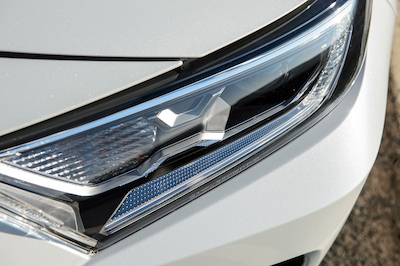
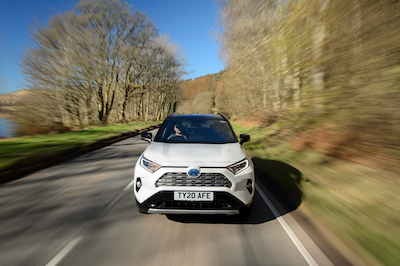
The Dynamic grade stands out with its bi-tone paint finish, striking a contrast between the bodywork colour (a choice of four) and a gloss black roof, plus projector LED headlights and black 18-inch alloys. In the cabin, sports-style seats, a black headlining and blue trim accents further emphasise the car’s distinctive quality. Options and accessories are available so owners can equip their RAV4 to perfectly meet their lifestyle preferences.

Panoramic View Monitor plus JBL audio system, panoramic roof

There are a range of premium features available on the all new RAV4. Such as a Panoramic View Monitor. This will provide drivers with a real-time 360-degree view of the area immediately around the vehicle. As well as a bird’s eye view from above.

This can be of use to drivers when they are off road. As you are able to better negotiate tricky terrain, help manoeuvring in confined spaces, helping to see hazards outside of driver’s line of sight.

The RAV4 can also come with a JBL premium audio system. While, it has been tailor made for the new RAV4. It provides you with concert sound quality in it’s 9 speaker architecture. The system features JBL’s signature horn tweeters, a powerful new subwoofer and an amplifier with Clari- FiTM music restoration technology.

While, you are also able to have an optional opening panoramic sunroof.

Connected Services

On the new RAV4 connected services have been introduced.

The services (alongside the roll-out convenience and peace of mind features from 2019) include: Last Mile Guidance, Send to Car Navigation, Find my Car, Driving Analytics and Maintenance Reminder.

Toyota RAV4 Hybrid UK MODEL RANGE

While, the new RAV4 is available in four equipment grades, Icon, Design, Dynamic and Excel, offering a wealth of comfort, convenience and technology features that meet the requirements and preferences of today’s SUV customers.

So, at the entry point to the range, the RAV4 Icon is available exclusively with front-wheel drive. The standard features include: –

  • 17-inch alloy wheels
  • Front fog lights
  • Rear parking sensors
  • Rain-sensing wipers
  • Dusk-sensing headlights
  • Auto-dimming rear-view mirror
  • Push-button start
  • Roof rails
  • Parabola LED headlights
  • Rear privacy glass
  • Electronic parking brake
  • Power-adjustable heated door mirrors with auto-folding function
  • Toyota Touch 2 with eight-inch multimedia touchscreen
  • Smartphone integration with Apple CarPlay and Android Auto
  • Seven-inch colour TFT driver’s multi-information display
  • DAB
  • Toyota Safety Sense 2
  • eCall
  • Rear-view camera

Design Model

While, the Design model can be specified with front or all-wheel drive and adds features including: –

  • 18-inch five-spoke alloy wheels
  • Smart Entry
  • Power back door
  • Front parking sensors

Excel Model

So the Excel model extends the Design specification with: –

  • Projector LED headlights
  • Blind Spot Monitor and Rear Cross Traffic Alert
  • Power-adjustable heated door mirrors with auto-folding function and puddle lights
  • Heated front seats
  • Driver’s seat with power slide adjustment and lumbar support and memory function
  • Full leather seat upholstery
  • Heated steering wheel
  • Headlight cleaners
  • Windscreen wiper de-icer (front)

So, the options for the RAV4 Excel are a nine-speaker JBL premium sound system, packaged with a Panoramic View Monitor, and an opening panoramic roof (this choice replaces the spare wheel with a tyre repair kit).

Striking a more sporting appearance, the RAV4 Dynamic adopts (further to the Design specification): –

  • Black five-spoke 18-inch alloy wheels
  • Heated front sports seats
  • Bi-tone metallic paint
  • Black interior headlining
  • Projector LED headlights
  • Blind Spot Monitor and Rear Cross Traffic Alert
  • Power door mirrors with auto-folding function and puddle lights
  • Driver’s seat with power slide adjustment and lumbar support

The same options are available as for the Excel grade.

Customers can choose from a range of nine exterior colours, including new Urban Khaki, Cyan Splash, Obsidian Blue and Galaxy Black. Metallic paint and a bi-tone finish are included in the standard specification of the Dynamic models, combining a black roof and pillars with White Pearl, Silver Blade, Decuma Grey or Obsidian Blue bodywork. On Excel models, the leather upholstery can be specified in black, grey or beige.

YOSHIKAZU SAEKI – CHIEF ENGINEER Toyota RAV4 Hybrid

Yoshikazu Saeki joined Toyota in 1987, he has taken many key important roles in the development of the Toyota Avalon, Camry and the Lexus brand.

As recently he has been involved in Toyota’s expansion globally. While, bringing his talents and experience to develop new technologies, platforms and models.

Saeki said of the new RAV4:

“The RAV4 has held a strong market presence since its introduction 25 years ago. It has gained a loyal following the world over, continually evolving to respond to changing customer needs. For the new RAV4, we set out to create a product that appeals to the next generation of customers.

“The first thing we considered was how we could redefine RAV4’s product value. We addressed the fundamental reason for its being and thought about how we could create an SUV that can withstand the test of time – one that can last for the next 25 years.

“It is never easy to create a new concept in such a strictly segmented and increasingly competitive market. We needed to deliver a ‘wow’ factor to customers, inspire them with a vehicle that has exceptional presence and highlight the benefits of owning it. These were the foundations on which we developed the fifth generation RAV4.

“Since the first generation model, there have been two over-arching views of the RAV4 – ‘driving performance suited to any road’ and a ‘user-friendly interior suited to any situation’. It was my mission to evolve these views.

“This means the RAV4 should have a strong presence and reliable toughness on any road while offering a stress-free driving experience for driver and passengers.

Cont…

“At the very beginning of the design process we thought about how best to evolve the original concept. This led us to the new concept of Adventure and Refinement. Adventure sends out a simple, strong message that drivers can drive anywhere they want, expressing waku-doki – the equivalent of ‘heart-pumping excitement’ in Japanese. Refinement is expressed in a sophisticated design that fits in with an urban setting.

“Combining these contrasting elements enhances the new RAV4’s unique value. Furthermore, its wide stance, large tyres and raised ground clearance create a strong image which are further emphasised by the polygon design theme and the vehicle’s multipurpose capabilities. Just looking at the new RAV4 triggers the urge to get in and go somewhere.

“Where vehicle performance, handling and stability are concerned, we defined the key concept as ‘Confident and Natural’ – with the driver’s sensibilities at the heart of everything. As a team we put great effort into improving the driving experience by focusing on enhancing tyre-to-ground contact, stable and natural cornering and smooth, responsive driving.

“We’ve improved the RAV4’s performance to meet the demands of any road. Whereas a conventional SUV suspension makes for an uncomfortable, unresponsive ride in off-road conditions, the RAV4 provides saloon-like comfort and an enjoyable ride.”

Press Pics
PreviousNext
12345678910111213141516171819202122232425262728293031323334353637383940414243444546474849

Tech Specs

PreviousNext
123456

So, keep up to date with everything How To Kill An Hour by signing up to our newsletter by clicking here!

Also, let us know what you think of the show by clicking here!

Furthermore click here to subscribe to our YouTube Channel to see more amazing ways to kill time!

While you are there follow us on Twitch by clicking here!

https://wp.freedomhost.uk/howtokillanhour/wp-content/uploads/sites/65/2020/08/front3-4-v5-whitebg-r4-scaled-1.jpg 580 1000 billywright http://wp.freedomofcreation.co.uk/howtokillanhour/wp-content/uploads/sites/65/2017/09/htkah-web-logo-2017.png billywright2020-08-16 20:55:572020-10-14 20:39:02Toyota RAV4 Hybrid

MLB Fans But Photoshopped

29th July 2020/in Gadgets / Tech/by billywright

Baseball is back, but it will look a little different due to COVID. Empty stadiums and cardboard cutouts instead of fans. Though if you watch on Fox Sports you’ll see digitally rendered fans filling the entire stadium. Starting with this Saturday’s Yankee’s-National’s game. They’ll even be piping in fake fan audio, much like the Premier League and Sky, BT and the BBC did!

CGI Fans

All 30 MLB teams are relying on fake fan noise in the stadiums themselves. The audio is sourced from Sony’s MLB The Show games. The usual in stadium announcers, walk up music and other aspects of MLB games will be on show. While it is only Fox Sports who have announced virtual fans.

“We believe the crowd and seeing people in seats is part of a broadcast, is part of broadcasting high level sports in the major leagues. So we wanted to come up with a solution for that,” 

“We’re not looking to fool anybody, it’s still about the game. But shot-to-shot, when you’re watching a broadcast, it’s not more noticeable that you’re watching what is normally a broadcast with fans in just an empty stadium and having it feel weird — we want to give people a sense of normalcy,” Zager says. “And we felt like going down this path and trying to use a virtual crowd will hopefully make it so that blends in, and you can focus on the game more because you’re not thinking about the emptiness of a Major League Baseball stadium during the game.” Brad Zager, executive producer and head of production and operations at Fox Sports.

MLB Fake Fans – How It’s Done

The effect is a great combination of augmented reality software. Which is used to insert the crowds, this is called Pixotope. This has been used for AR graphics for the Super Bowl for example.

The way it works is by leveraging graphics which are created by Silver Spoon animation agency. Which is built in Epic’s Unreal Engine. Unreal Engine is used here in the same way that it would for video games or for crafting on-set backgrounds for shows like The Mandalorian. What makes Unreal Engine better from the rest is that it can render in real time, making it suitable for live tv.
While SportsMedia Technology, they are the ones who portray sports centric computer overlays for things such as the screen clock and sportsboard. They will handle the camera tracking to insert graphics on to the live camera feeds. Four cameras located at the following points on a baseball field. High home, centerfield, high first, and high third cameras. This will show the fans.

Producer Control

The producers at Fox Sports will be able to control how the crowds are dressed. Based on the weather for example, they can also account for the percentage of home and away fans. Though they’re currently working out how to make these decisions.

 “We’re figuring this out right now, and we’ll continue to evolve that process as we go through this weekend and from game-to-game, week-to-week,” Brad Zager.

The broadcasts will also integrate fake fan audio being played in the stadium in the background of microphone clips from players, such as when they pitch. It’ll augment the live audio on it’s own end, similar to how the MLS games are being shown.

It’s rather basic now, such as boos and cheers. Though the company are hoping to integrate the two as it gets more practice over the season.

 “It’s something that we hope becomes even more collaborative and more on the same page as we do this more and more, being able to combine the audio and the crowd together.”

Currently it’s only available on MLB games on Fox, though it is possible that the digital fans could appear elsewhere. Zager says that they’re working with all of it’s sponsors “as we get closer to the fall for football and other sports, if we feel like it’s going in the right direction yet we will launch it and roll it out on other sports,” too.


Keep up to date with everything How To Kill An Hour by signing up to our newsletter by clicking here!

Let us know what you think of the show by clicking here!

Click here to subscribe to our YouTube Channel to see more amazing ways to kill time!

Follow us on Twitch by clicking here!

https://wp.freedomhost.uk/howtokillanhour/wp-content/uploads/sites/65/2020/07/MLB-Fans.png 277 500 billywright http://wp.freedomofcreation.co.uk/howtokillanhour/wp-content/uploads/sites/65/2017/09/htkah-web-logo-2017.png billywright2020-07-29 16:29:102020-07-30 15:35:56MLB Fans But Photoshopped

Reon Pocket – Wearable Air Conditioner

22nd July 2020/in Gadgets / Tech/by billywright

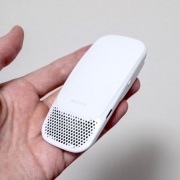
Reon Pocket is a wearable air conditioner, which is produced via it’s First Flight internal startup platform. It’s palm sized and is a white device that charges over USB-C and connects to an iOS or Android phone via Bluetooth.

There’s a silicone pad on the back which presses against your skin and uses the Peltier effect to cool or warm itself up by absorbing and releasing heat. You can use it handheld but it is best used with Sony’s special V-neck undershirts. As they have a pocket on the inner back. Helping the device to rest between your shoulder blades.

Reon Pocket’s app is simple to use and gives you direct control over the temperature settings. There’s three levels of cooling or warming and a boost mode. Which is limited to two minutes and a control over the speed of the “fan”. Also you can set automatic modes which will auto start whenever you start the device using the power button. Rather than using the app. The device weighs 80g and lasts 2-3hours on a charge. Though this does depend on the intensity of the settings.

The Reon Pocket is available now although it is exclusive to Japan. It costs $122 dollars for the device and the undershirts cost $17 each. While the app does work in English if you wish to import it.

(The Verge)

Keep up to date with everything How To Kill An Hour by signing up to our newsletter by clicking here!

Let us know what you think of the show by clicking here!

Click here to subscribe to our YouTube Channel to see more amazing ways to kill time!

Follow us on Twitch by clicking here!

https://wp.freedomhost.uk/howtokillanhour/wp-content/uploads/sites/65/2020/07/Reon-Air.jpeg 453 680 billywright http://wp.freedomofcreation.co.uk/howtokillanhour/wp-content/uploads/sites/65/2017/09/htkah-web-logo-2017.png billywright2020-07-22 15:50:352020-07-22 15:50:35Reon Pocket – Wearable Air Conditioner

Adobe Stock Audio

22nd July 2020/in Gadgets / Tech/by billywright


Adobe Stock Audio is here to kickstart your creative juices and level up your projects!

Launched in 2015, Adobe Stock is a service that provides creatives all over the world access to high end stock images and video  for your creative projects saving you hours of time looking for that perfect bit of visual content and more importantly allowing you to spend more time doing what you do best.. creating . Could not get any better than that right? 

WRONG

To celebrate Adobe Stock’s five-year anniversary, Adobe announced the launch of Adobe Stock audio, an exciting integration between Adobe Stock and Adobe’s video editing program “Premiere Pro” that enables you  to access over 30,000 audio tracks without having to leave your video editing software. 

No scrolling through tabs after tab on the Internet signing up to music other music libraries, trying to read the small print to find out what kind of license you need for your project…no forget that…..all of it can be done inside the premiere pro software saving you time and letting you get on with what you need to do best. create awesome content

To prove how kick ass it is, Adobe teamed up with 13 talented filmmakers from all over the world and challenged them to produce a film in under five days with unlimited access to Adobe Stock footage, and Adobe stock sound.

The shorts were premiered at the Adobe Stock Film Festival’s. The first ever film festival to be created without a single camera. Keep listening to the show to find out how things went down.

But don’t forget. For all of your stock image video and now audio needs all in one place….save yourself a bunch of time and use adobe stock audio!

Adobe Stock Audio

Music plays a key role in adding emotion, feeling and mood to a video, podcast or any creative project for that matter! As it determines how an audience feels and engages with the story. So, this is where Adobe Stock comes into play. Adobe Stock audio gives you access to thousands of high quality, royalty free music tracks.

These audio pieces are sourced from world class award winning artists and industry providers. They are really really good as well, they’re fantastic! The service is incredible too as it can easily find the perfect track for whatever you’re working on in minutes!

Right from within Adobe Premiere Pro, with an intuitive in app search experience. Allowing you to browse expertly curated music libraries to get the right tone for projects.

There’s an effortless licensing process and flexible pricing plans, Adobe Stock audio gives you access to royalty free music for all types of media projects. Adobe Stock audio’s providers of mood and genre music from Epidemic Sound and Jamendo!

Features

  • Effortless one-click save and license feature
  • Easy access with Premiere Pro Integration
  • Intuitive and powerful search using Adobe Sensei

Adobe Stock is working in partnership with Epidemic Sound to launch ‘Storytellin Smooth’ an inspiration meets educational content series of compelling stories from creators who understand the importance of music and showcase the impact it has on video production.

Check out Adobe Stock on Instagram for ongoing updates around this!

(Adobe Stock)

Listen to the guys chatting about this by clicking here! 

Keep up to date with everything How To Kill An Hour by signing up to our newsletter by clicking here!

Let us know what you think of the show by clicking here!

Click here to subscribe to our YouTube Channel to see more amazing ways to kill time!

Follow us on Twitch by clicking here!

https://wp.freedomhost.uk/howtokillanhour/wp-content/uploads/sites/65/2020/07/Adobe-Stock-portfolio.jpg 700 700 billywright http://wp.freedomofcreation.co.uk/howtokillanhour/wp-content/uploads/sites/65/2017/09/htkah-web-logo-2017.png billywright2020-07-22 15:23:322020-07-22 16:53:59Adobe Stock Audio

Twitch Radio

22nd July 2020/in Gadgets / Tech/by billywright

The streaming powerhouse Twitch, mainly used to stream esports, is going old school, in a new school kinda way. They are partnering with Radio.com, parent Entercom for interactive livestreams of sports radio stations. All around Major cities in the US!

This was first reported by Variety and will see Radio.com sports stations stream on Twitch in the following locations:

  • Boston (WEEI in Boston)
  • New York (WFAN 101.9 FM/660 AM)
  • Dallas (105.3 The Fan),
  • Chicago (670 The Score),
  • Atlanta (92.9 The Game), and
  • Detroit (97.1 The Ticket)

They’ll each have their own dedicated branded channels on Twitch too. VP David Rosenbloom said that the partnership would introduce sports broadcasting to a ‘new generation of fans’

Twitch is more than just games

Twitch isn’t just a gaming platform anymore, with the streaming giant expanding it’s content offerings on the platform. So it now includes other entertainment as well. Director of New Verticals at Twitch Jane Weedon said in a statement that Twitch has seen a growing community of sports fans on the platform.

“Twitch is the place where people come to connect and engage over their shared interests, and you’ll be hard-pressed to find a group of people more passionate than sports fans,”

“With the addition of sports radio, on-air talent and fans will be able to interact and discuss their favourite athletes, teams and leagues with one another in real time.” Jane Weedon

Weedon added that the users will be able to join in the conversation with Twitch’s Chat feature, much like the long cherished call in format of talk radio stations.

This deal arrives at a time in an uncertain time for sports as COVID pummels sports industries all over the world. With sports stadiums remaining a no-go area for the time being. Radio still has plenty of opportunities to keep fans connected to the teams they love including analysis and interviews.

(Engadget)

Listen to the guys chatting about this by clicking here! 

Keep up to date with everything How To Kill An Hour by signing up to our newsletter by clicking here!

Let us know what you think of the show by clicking here!

Click here to subscribe to our YouTube Channel to see more amazing ways to kill time!

Follow us on Twitch by clicking here!

https://wp.freedomhost.uk/howtokillanhour/wp-content/uploads/sites/65/2020/07/Twitch-Radio.jpg 349 620 billywright http://wp.freedomofcreation.co.uk/howtokillanhour/wp-content/uploads/sites/65/2017/09/htkah-web-logo-2017.png billywright2020-07-22 14:59:412020-07-22 15:00:16Twitch Radio

KFC and it’s Lab Made Chicken

22nd July 2020/in Gadgets / Tech/by billywright

The Verge are reporting that KFC have teamed up with Moscow’s 3D Bioprinting Solutions with the end goal of producing the world’s first lab made chicken! Specifically chicken nuggets!

Moscow’s 3D Bioprinting Solutions are looking to develop an additive printing technique. Which will use chicken cells and plant material that will recreate the taste and texture of natural chicken. While at the same time keeping involvement to a minimum. Furthermore, to achieve the goal of creating lab printed chicken. KFC will provide bread, spices and other ingredients to match the restaurants signature flavour. So, when do you think KFC will achieve this? KFC are hoping to have a final nugget design completed and ready to test by Moscow in autumn of 2020!

Lab produced meat has numerous advantages. For one, it is more environmentally friendly as it doesn’t require as much resources. According to KFC, a study suggests it requires 100 times less farmland and even cuts greenhouse gas emissions by 25 times! There’s less chemicals involved too, which means there’s less harm to animals!

Bioprinted meat, much like KFC’s plant-based chicken, allows the chain to be available to a wider audience. The food chain is also more stable and KFC will deal with less shortages as a result!

(Engadget)

Listen to the guys chatting about it here!

Keep up to date with everything How To Kill An Hour by signing up to our newsletter by clicking here!

Let us know what you think of the show by clicking here!

Click here to subscribe to our YouTube Channel to see more amazing ways to kill time!

Follow us on Twitch by clicking here!

https://wp.freedomhost.uk/howtokillanhour/wp-content/uploads/sites/65/2020/07/kfc9.jpg 493 876 billywright http://wp.freedomofcreation.co.uk/howtokillanhour/wp-content/uploads/sites/65/2017/09/htkah-web-logo-2017.png billywright2020-07-22 14:41:162020-07-22 15:02:02KFC and it’s Lab Made Chicken

Tips To Help Improve Broadband Speed!

30th June 2020/in Gadgets / Tech/by billywright

USwitch want to help with solving the UK’s Top Broadband Issue – Slow Speed! USwitch’s own broadband expert Nick Baker decided to share his top tips on how to solve this very issue.  

Thinking ” where are the best Internet providers in my area?”, well we are too.

Tips to Help Improve Broadband Speed

There’s a number of reasons as to why your broadband connection may be slow. One of the reasons could by multiple devices using the same network in your area. Or a large number of devices on your home connection.

See below USwitch’s best tips!

1. Carry out a broadband speed test so you can see just what speeds you’re getting. Also, try doing this at different times during the day and take a screenshot or a note of the result.

2. Check and see if your browser software is up to date. Having the latest version of your browser can really help speed up the way web pages load.

3. Is your router next to any other wireless devices? Anything from a wireless doorbell to fairy lights can have an impact on the speeds you’re getting. So, my tip would be to place your router on a small side table away from any other devices (rather than on the floor) and keep it switched on at all times.

4. Ensure you have a strong password protecting your Wi-Fi network to make sure nobody else is using it. As this is particularly important if you live in a flat or apartment.

5. Is your router firmware up to date? So, your router should update automatically, but you can force a reset (check the back of the device for instructions) and this can help with broadband speed.

Even more tips!

6. Have you tried using a cable? Routers usually have an Ethernet cable socket in the back of the device so you can connect directly to them. Try using this and running the speed test again to see if you get faster results. Again, keep a note of these speeds.

7. Have you checked for interference on your phone line? Purchase some microfilters or get them from your provider. Plug them into every phone socket in your house as they split the broadband and phone signals so they don’t interfere with one another.

8. Are you using a phone line extension cable? These (especially if they are long) can impact the speed of your broadband. If you need to use one, make sure it’s high quality and as short as possible and not tangled up.

9. Plug your router directly into the main phone socket. These sockets usually have a line running across the front of them. Also, make sure your router is connected to this socket then try running the speed test again.

10. Contact your broadband provider.  So, if all else fails and you’re still struggling, then it’s worth getting in touch with your broadband provider. You can share your speed test results and they will work through a series of diagnostic tests to isolate the issue and get you back up to speed in no time.

(USwitch)

Slo, keep up to date with everything How To Kill An Hour by signing up to our newsletter by clicking here!

Also, let us know what you think of the show by clicking here!

Furthermore, Click here to subscribe to our YouTube Channel to see more amazing ways to kill time!

While you are there, follow us on Twitch by clicking here!

https://wp.freedomhost.uk/howtokillanhour/wp-content/uploads/sites/65/2020/06/broadband.jpg 313 500 billywright http://wp.freedomofcreation.co.uk/howtokillanhour/wp-content/uploads/sites/65/2017/09/htkah-web-logo-2017.png billywright2020-06-30 15:27:472020-09-29 14:04:13Tips To Help Improve Broadband Speed!

Apple Watch Pride 2020 Bands!

23rd June 2020/in Gadgets / Tech/by billywright

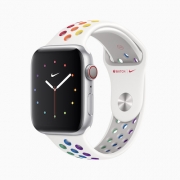
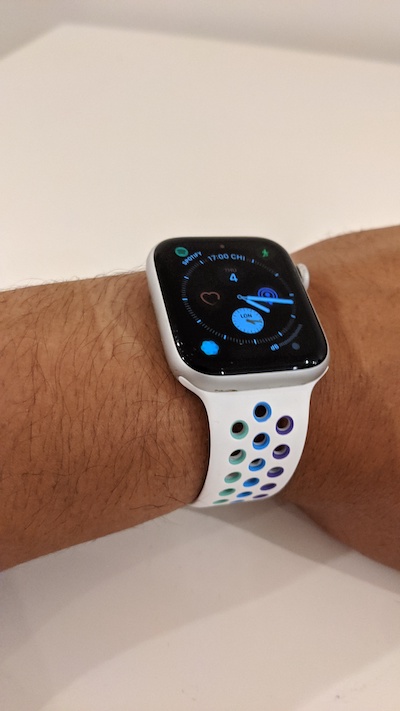
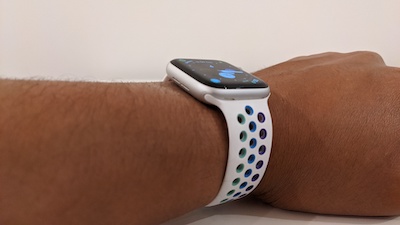
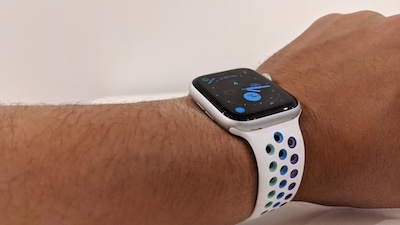
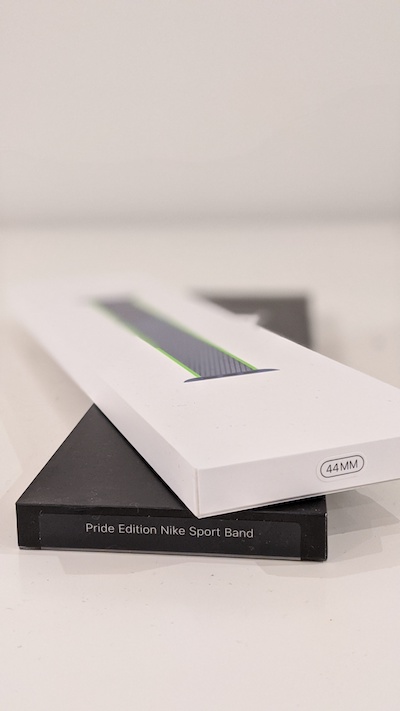
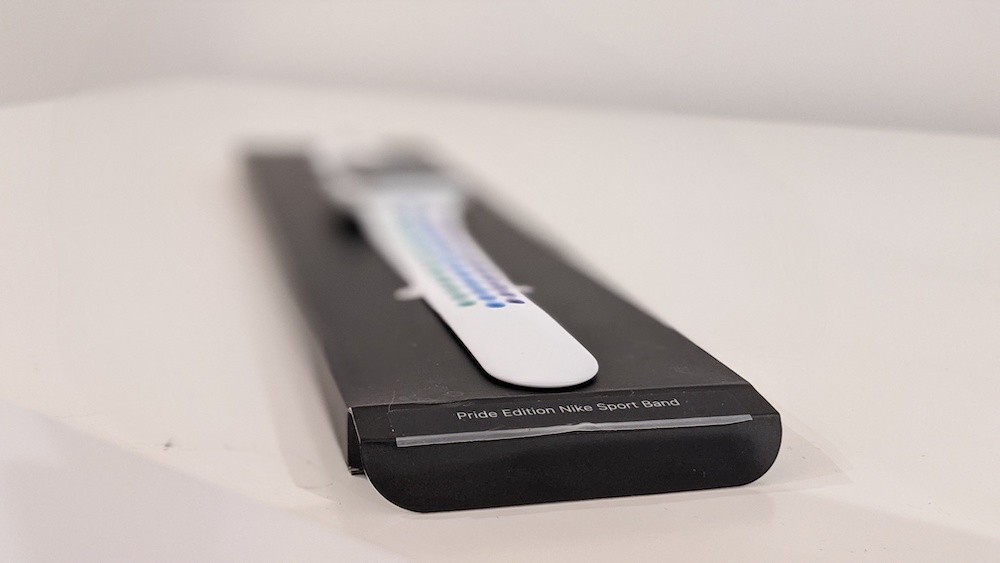
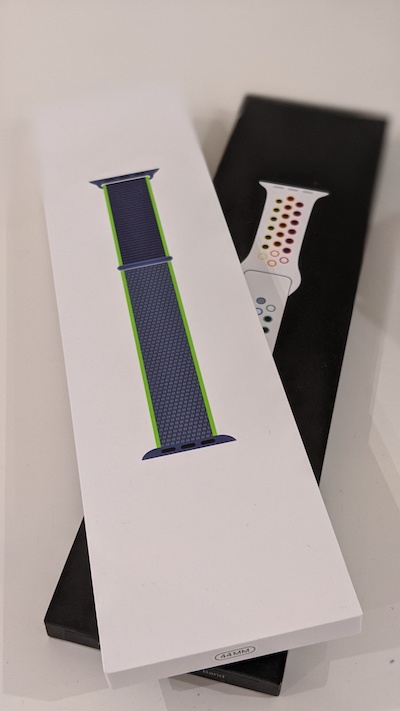
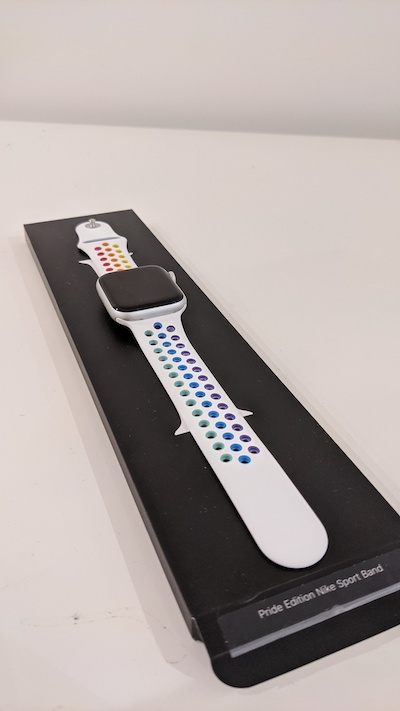
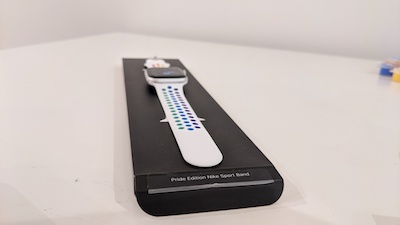
Apple are celebrating PRIDE month by releasing some special Apple Watch Nike Sport Bands!They’re made from a custom high performance fluoroelastomer with compression-moulded perforations for breathability. This gives a durable, strong and soft finish to these beautiful bands. The smooth dense material will sit on your wrist and fit comfortably on your skin. Whilst providing a secure and safe fit with an innovative pin and tuck closure.

Apple is supporting LGBTQ advocacy organisations working to bring about positive change, including Encircle, Gender Spectrum, GLSEN, PFLAG, SMYAL, The National Center for Transgender Equality and The Trevor Project in the US, and ILGA World internationally. Plus pair beautifully your Apple Watch Pride band with new matching Pride Watch faces that are coming soon as a part of watchOS 6.2.5!

Through this effort, Apple and Nike are proud to support LGBTQ organisations doing vital advocacy and community-building worldwide, including GLSEN, PFLAG, The Trevor Project, Gender Spectrum, The National Center for Transgender Equality, and ILGA World, which brings together more than 1,500 member organisations in more than 150 countries and regions.

PreviousNext
12345678
Apple Watch
Apple Watch
Apple Watch
Apple Watch
Apple Watch

(Apple)

Purchase your own Apple Watch Pride bands by clicking here!

Keep up to date with everything How To Kill An Hour by signing up to our newsletter by clicking here!

Let us know what you think of the show by clicking here!

Click here to subscribe to our YouTube Channel to see more amazing ways to kill time!

Follow us on Twitch by clicking here!

https://wp.freedomhost.uk/howtokillanhour/wp-content/uploads/sites/65/2020/06/Apple_watch_s5-l-almsvr_nike-pride-ss20-watch-pride-edition_05182020.jpg 400 400 billywright http://wp.freedomofcreation.co.uk/howtokillanhour/wp-content/uploads/sites/65/2017/09/htkah-web-logo-2017.png billywright2020-06-23 17:02:522020-06-24 14:15:05Apple Watch Pride 2020 Bands!
WWDC20

WWDC20: Everything that went down!

23rd June 2020/in Gadgets / Tech/by billywright

Lots got announced at WWDC20, so let’s crack on and tell you all about them!

iOS14 – WWDC20

iOS14 is a fairly big update at WWDC20. With Apple’s main focus to improve performance and reliability. Whilst expanding on a number of features which have been added previously. There’s been updates to search, widgets added to the homescreen, improvements to message and better sleep tracker.

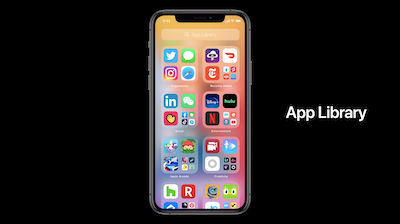
Apple is allowing you to adjust your iOS14 home screen. You can move apps around and group them in new ways, such as hiding apps from the main home screen and adding them to a new App Library. A way to highlight all of your apps and group them automatically, in one big beautiful list. Even will learn what apps you use the most and group them at the top as an app suggestion.

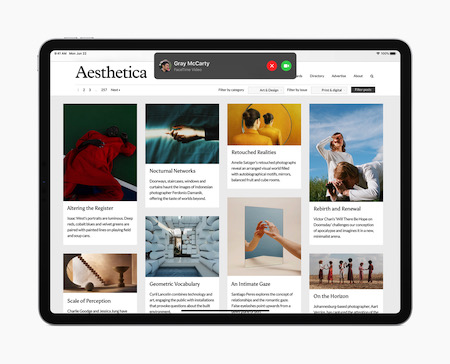
Apple will also show incoming calls, (Facetime included) in a new more compact view which simply drops down from the top of view.

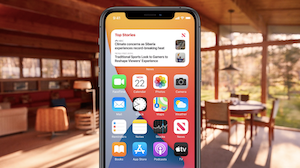
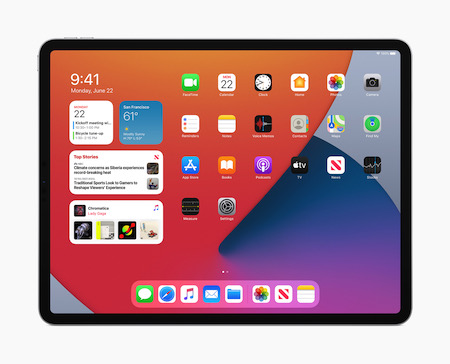
Widgets is being added to the Home Screen. Which are customisable in size and can add them where you want on screen. There’s a new gallery app which will make widgets easier to find. Whilst Smart Stack will stack multiple widgets on top of each other. You can then swipe through them easily, showing you the most important information on each one.

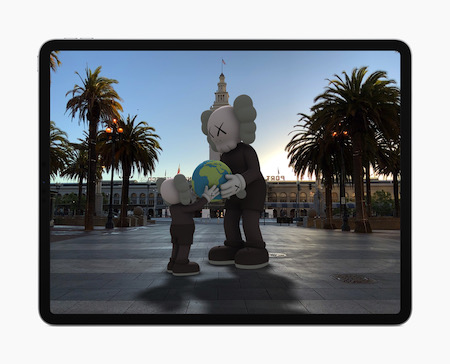
Picture in Picture is being added to iOS 14. You can watch videos and re-size the player when multitasking. Videos can even be played in the background by swiping the video all the way to the left/right of the screen. Visuals will disappear, yet the audio will remain. Simply swipe back to view your video.

Messages

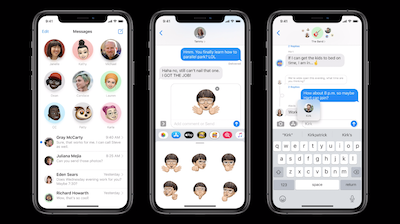
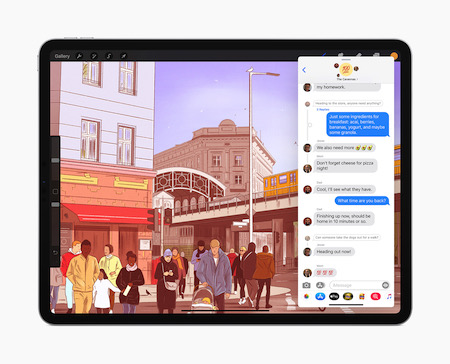
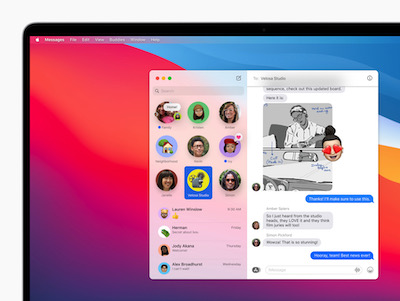
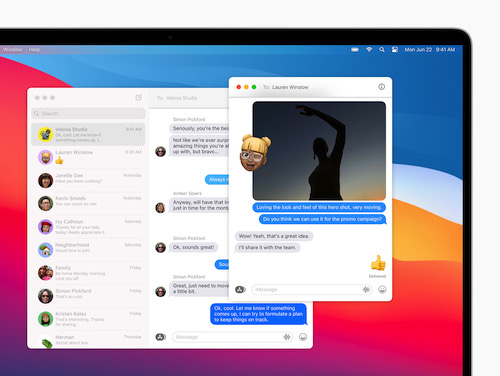
Memoji is also getting customisable options such as a new face mask customisation option. Apple will add inline replies to Messages, allowing you to respond to a specific comment in groups. You can also tag people within groups as well. Groups are being enhanced so you get a better idea of who is in the chat and who spoke recently.

The messages app will also let you pin select chats at the top of the screen, so they’ll always be at the top.

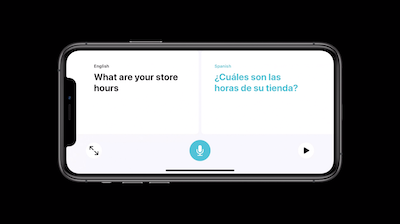
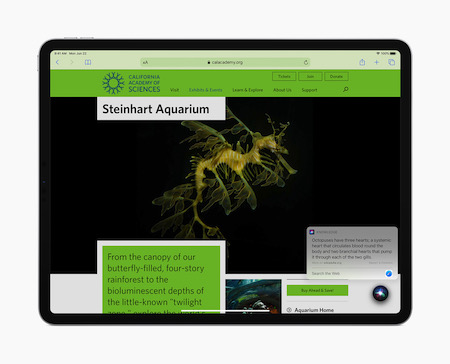
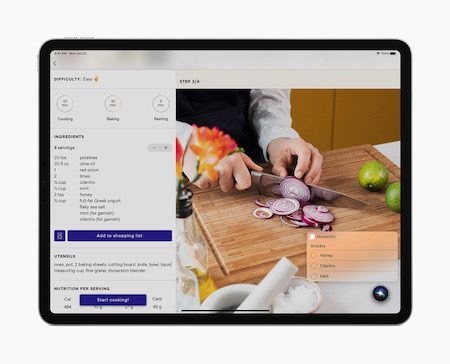
Siri is also getting a new smaller streamlined view. With Siri getting an update itself. Better translation support and the ability to send audio messages.

Car Key

Apple have introduced CarKey which will allow you to unlock your car wirelssly simply by tapping a few buttons on your phone. First up to use this is the 2021 BMW 5 Series. Set up is simple as pairing your Apple Watch or iPhone with an eligible car. Then when you want to unlock your car, just hold your device near the NFC receiver on the car. Then use Face ID or Touch ID to confirm your identity.

CarPlay is getting custom wallpapers and new apps such as parking apps, EV charging apps and food apps.

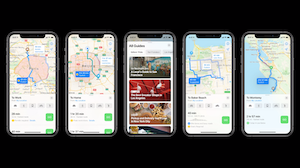
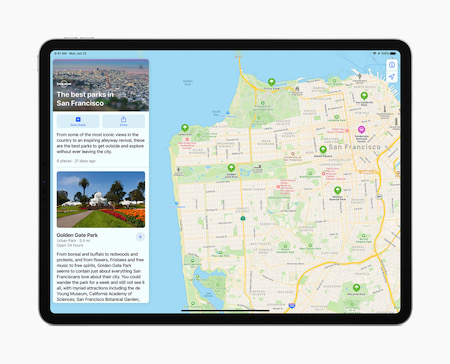
Apple is updating the Maps app with new cycling routes, EV charging info and a range of new guides covering points of interest in a specific area. Such as tourist destinations, shops and best restaurants.

You can add your own guides and add their favourites to a list of suggestions. When new places get added by Apple, that info will automatically update in your customised guide as well.

Clips

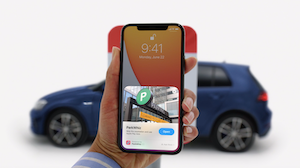
App Clips is being introduced too. A way of accessing small snippets of an app, without having to download and install a full app. App Clips can be accessed via the App Library, a special QR Code or NFC Tag too. This would be helpful for parking places that uses apps or things like bikes or scooters in cities. Better yet, sign in with Apple can be used to sign up for an account quickly and easily without having to make a brand new account for everything.

PreviousNext
1234567

(Gizmodo)

iPad OS14 – WWDC20

As well as receiving the same additions as iOS14, such as App Library, a smaller Siri notifications, Widgets and smaller incoming call notications iPad OS14 is also getting upgrades of it’s own!

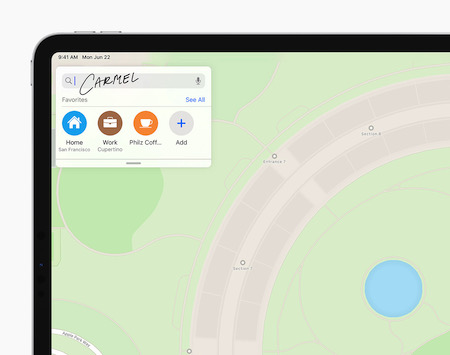
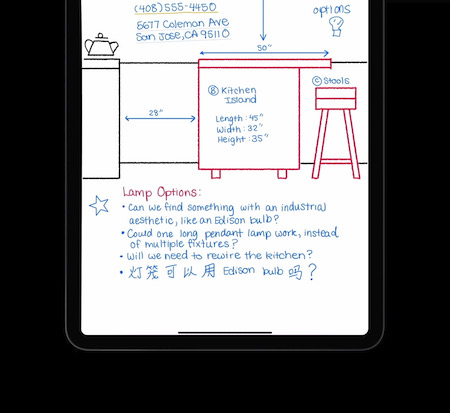
Apple Pencil is receiving one of it’s biggest improvements. One of them that’s impressive is the Scribble feature. You can now handwrite into any text field and iPad will automatically change it to text. If you handwrite on the same page as drawings you can select the handwriting and avoid the surrounding art. Furthermore you are able to change the colour of the text and move the text around in the doc.

iPad will also recognise Chinese and hand-written addresses and phone numbers.

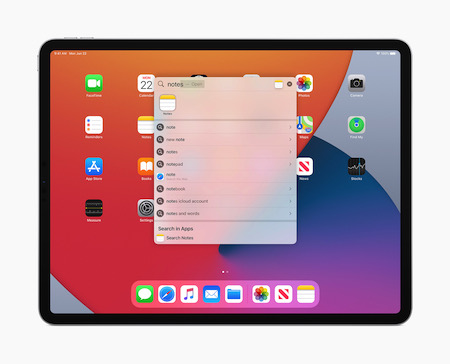
Universal search is also being added. Start typing into the search bar and you can launch, apps, websites and documents instantly.

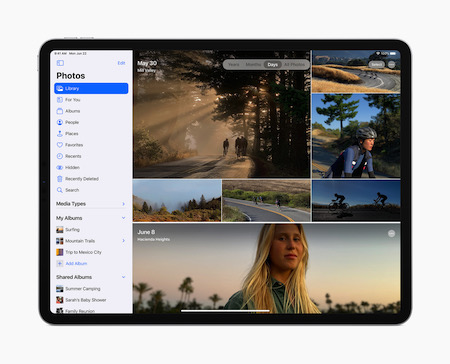
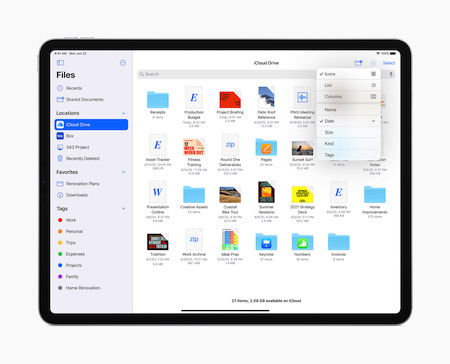
An all-new sidebar will bring additional navigation features to Apple apps. Apple highlighted this from within it’s own Photo app. You can drag a photo from an album into the sidebar and move it to another album. A streamlined toolbar, with additional controls, and side bar will also appear in mail, notes and files.

(Engadget)

PreviousNext
123456789101112131415

Watch OS7 – WWDC20

Apple now let you personalise your own watch faces with Face Sharing. When you see a face you like you can add the watch face directly to your watch. Even if you don’t have the complications needed for that specific watch face. Also share the watch face by long pressing on a face you wish to share.

A new watch face is being added called the Chronograph Pro Face. This includes a tachymeter. The Photos face will offer different colour filters and a new X-Large face will let you add a rich complication. Developers are now able to add more than one complication per app on any watch face.

Health

Apple’s own Workout app gets a few additions too. Cycling tracking, which also includes directions and tips on when to dismount. Also Dancing gets added to the workout app. There are new sensors which can detect movement differences between the upper and lower body and even full body movement. This is done via ‘advanced sensor fusion’. So, using the accelerometer, gyroscrope and heat rate sensors to detect and differentiate movement.

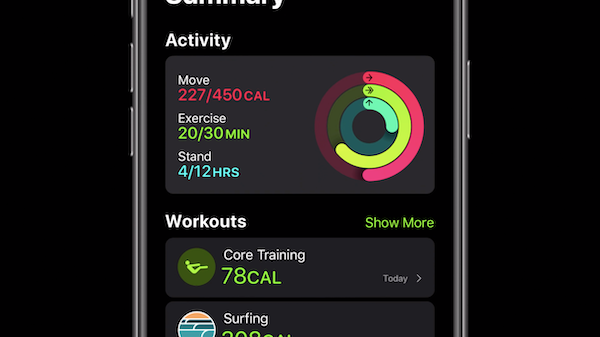
Activity app is being renamed Fitness and getting a new summary look at the top. It will also highlight a streamlined view of workouts and awards. Algorithms for Core Training, Dance, Functional Strength and Cooldown are also being added. While Core Training and Functional Strength training won’t track reps. It will only count calories for those exercises.

While WatchOS 6 added the Noise app now the Noise app will notify you when you listen to too much music in a week.

Sleep Tracking

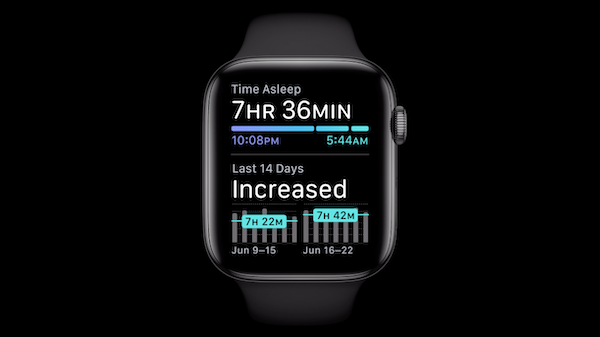
Apple is also adding sleep tracking, nativelty. There’s a section in the Health app for it. Apple says the Apple Watch will be able to detect ‘micro movements’ via the accelerometer. This will give you insights about respiration during sleep. You’ll receive on-wrist insights the next morning wich will show periods of wakefulness and sleep. Plus you’ll get charts of sleep trends. Though no breakdown of sleep stages such as REM, light and deep.

Furthermore the Apple Watch will be able to detect soap sounds and automatically start a 20second countdown complete with animations. It will also prompt users to wash their hands when they return home.

PreviousNext
1234

(Engadget)

macOS Big Sur – WWDC20

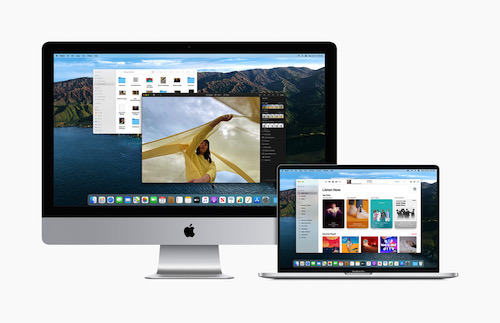
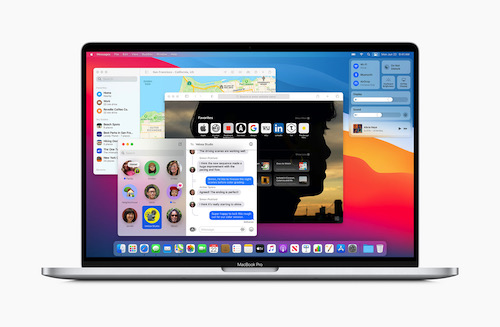
Mac OS X is getting one of the biggest upgrades in years. It’s called Big Sur and it’s visuals are getting a massive upgrade. WWDC20 is really impressing!

There’s now a customizable start page, a refined app dock and finer to make use of screen space better. Mail app has colors in the navigation interface and photos gets an updated sidebar. Gallery within photos is also backed by metal so animations show up quicker.

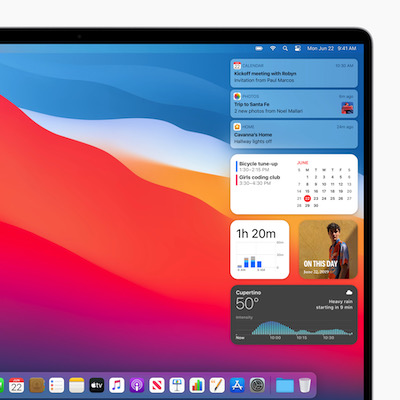
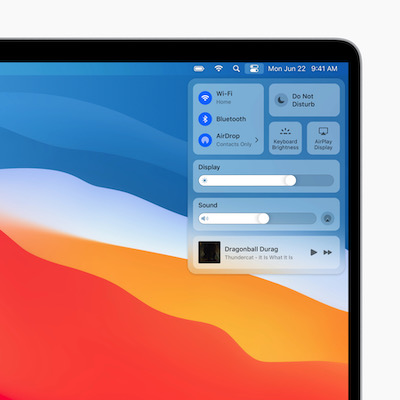
Menu bar is now translucent will take the color of your background. The menu bar is now customizable to give yourself one click access to Do Not Disturb. Simply drag and drop it from the settings. Notification Center has been updated to feature better organisation and add widgets of various sizes of the panel. Furthermore moving Mac OS and iOS closer. There’s an iOS-like Control Center to macOS.

Apps

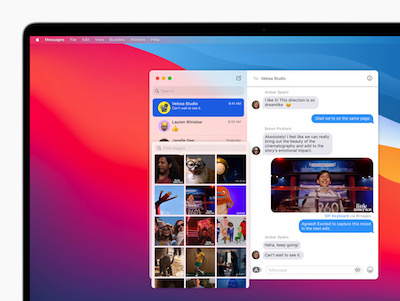
macOS’ messages app is getting an update. Much like it’s iOS counterpart, you’ll have direct in-line replies and group updates. It’ll get a powerful search function. It has been updated to organise your results into file types and matching terms. Memoji is able to be customised on the mac and animations will also show across the window.

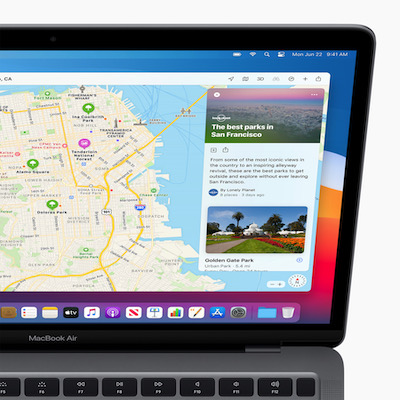
Maps is getting revamped and adding features such as indoor navigation for places like airports and shopping malls. You are also able to view and create Guides for your city for example. If you want to save cool spots you’ve visited simply add them and share them with your iPhone.

Safari

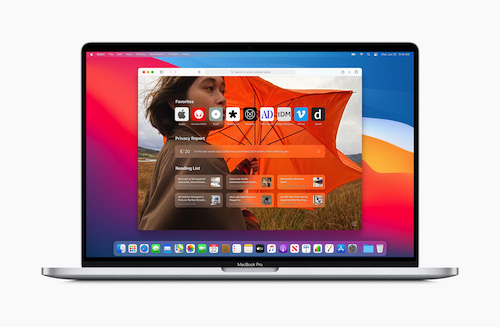
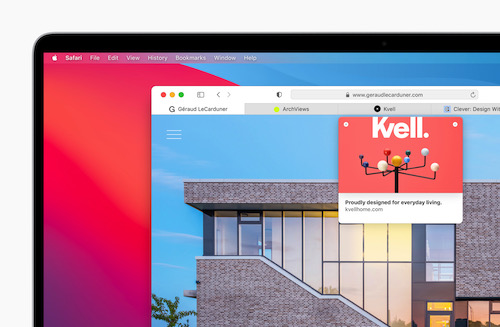
Safari is also getting a HUGE update. It will support extensions and they’ll be on the App Store for easier discovery. Each extension will have a button that shows up next to the URL box. Your browser is also customisable with your own photos as the background. Homepage will have sections such as a reading list and iCloud tabs.

Apple’s browser will have a built in translator, it will detect when you visit a website not in your default language and will ask you if you wish to translate the page or text. Tabs will also be easier to navigate. With loads on screen at once they will show favicons by default. Now when you hover over a tab, you’ll be presented with a preview thumbnail of the page.

PreviousNext
123456789101112

(Engadget)

Apple Silicone – WWDC20

Apple is moving away from Intel processors and will start using it’s own chips in it’s computers. The Apple Silicone project will create powerful, energy efficient processors. Leading to future Macbooks with superior battery life than what we have now.

These chips will have deep integration in Big Sur. All of Apple’s won software will run as native apps on Apple silicon-based Macs. Such as Final Cut Pro, while Microsoft’s Office Suite will also work on the Apple Silicon. Furthermore Adobe is doing the same for it’s creative cloud apps.

Mobile Apps

iPhone and iPad apps will now be able to run natively on Apple silicon based Macs. You can download them from the Mac App store. This will allow developers to develop apps that will work between various devices and minimal friction.

Apple expects the developers will be able to update their Mac apps quickly and they’ll have the tools to do so within Xcode12. Apple hopes that existing apps will work on silicon based Macs. With the use of Rosetta 2. This will basically translate code as necessary on the fly and allow virtualization for Linux. Apple unveiled a Developer Transition kit to help developers update and develop their apps.

Apple announced at WWDC20, that it expects the move to silicon based Macs in 2 years and as smoothly as possible. With the first set of Apple silicon systems to likely launch this year. While Apple are still working on Intel-based Macs and will support Macs with Intel processors for years to come.

(Engadget)

HomeKit & Apple tvOS14 – WWDC20

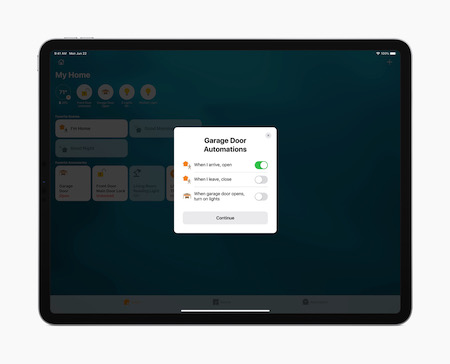
Apple said at WWDC20 that it’s improving the tech that we use in our homes. They’re looking improve the ease of use in with multiple products. Such as using Airplay to push a video to your Apple Tv. Using the Home app to control various other smart devices in your home, such as smart lights. Apple have said that they’re open-sourcing HomeKit to prioritise privacy and ease of use. So when you add a new piece of smart tech to the iOS 14 Home app, it will automatically suggest a list of automation options.

Apple currently support smart bulbs but now it’s adding Adaptive Lighting. This new feature can be used to change the colours you see in various rooms around the house, automatically based on preference.

Home Security

Home Security has got a nice upgrade too. It will let users specifically designate zones that they want to monitor whilst excluding activity outside of that zone. Therefore if you can only opt to be alerted about activity within an area. Facial recognition is being added for close contacts that you’ve tagged within your photos. Furthermore this feature will also extend to Apple’s own products such as HomePod. HomePod can alert you who is at the door, while Apple TV will display a video overlay from your security camera in the corner of your screen. Apple have said that all cameras connected to the Home App will be linked to tvOS14 as well as through the control center.

The Apple Arcade

Arcade on Apple TV is getting an upgrade in tvOS14. Multi-User support is coming and you can even pick up where you left off. Apple TV will also soon support Xbox Elite 2 controller as well as the Xbox Adaptive Controller.

Picture in Picture support is also coming to tvOS14.

A trailer for the Isaac Asimov’s Foundation was also shown at WWDC20

(Gizmodo)

(Gizmodo)

AirPods

Airpods in general will now be able to automatically switch between Apple devices. For example, finish up a podcast on your phone and then more to your iPad to watch a movie. Airpods will connect to the iPad without having to tap through to a Bluetooth menu. This process will be the same on a Mac. Simply you’ll soon be able to change from one device to the next simultaneously. Additionally you’ll switch to your phone if you get a call.

Airpods Pro

Furthermore the audio quality with Airpods Pro is improving. They’ll soon support spatial audio for more immersive experiences. Apple have developed custom algorithms to power this so it sounds like you’re in a theatre. It will also adjust to where your head is too so the audio will stay fixed when you moved your head. It does this by using the accelerometers and the directional audio filters and subtle frequency adjustments for each ear. The spatial audio feature will feature 5.1, 7.1 and Dolby Atoms!

(Engadget)

Privacy

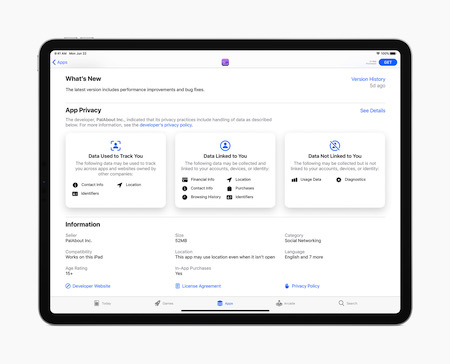
Apple’s huge focus for a long time has been user privacy. Therefore they’ve announced a bunch more improvements to this years set of updates. In every store (app store, mac app store) that Apple runs, developers will be required to show exactly what they tell Apple. That’s both data collection and tracking.

It will show all this information via a label which gives you the most important details. Saving users from having to read an entire privacy policy.

Locations services are getting a change. You can now decide to share a rough or less specific location are to a map. Therefore the app can’t track your movement as easily.

Tracking permissions across apps and websites are also having permissions added. This will make it easier to keep yourself private when browsing the internet.

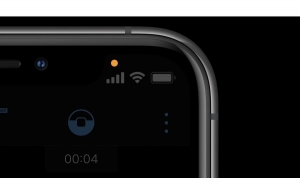
Small additions to mic and camera indications is that they’ll get a small light in the indication bar. Showing you exactly when they’re being used.

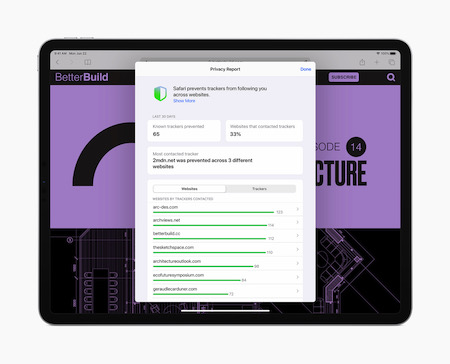
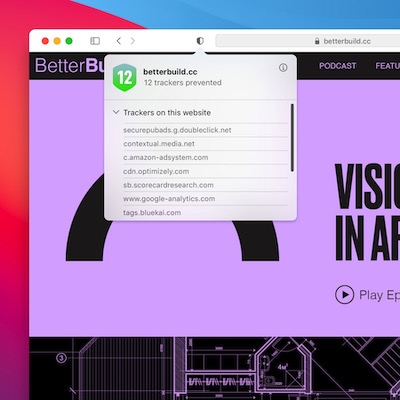
Safari is getting privacy updates too, you’ll now have finer control over how long websites and extensions have access to your data. A privacy report shows up when you press the shield icon next ot hte URL bar. This will also show what trackers are on the page.

(Engadget)

So that’s all of the information from WWDC20!

Keep up to date with everything How To Kill An Hour by signing up to our newsletter by clicking here!

Let us know what you think of the show by clicking here!

Click here to subscribe to our YouTube Channel to see more amazing ways to kill time!

Follow us on Twitch by clicking here!

https://wp.freedomhost.uk/howtokillanhour/wp-content/uploads/sites/65/2020/06/WWDC20.jpg 551 980 billywright http://wp.freedomofcreation.co.uk/howtokillanhour/wp-content/uploads/sites/65/2017/09/htkah-web-logo-2017.png billywright2020-06-23 16:47:122020-06-24 15:19:50WWDC20: Everything that went down!

Quench Sea

23rd June 2020/in Gadgets / Tech/by billywright

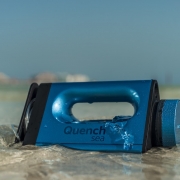
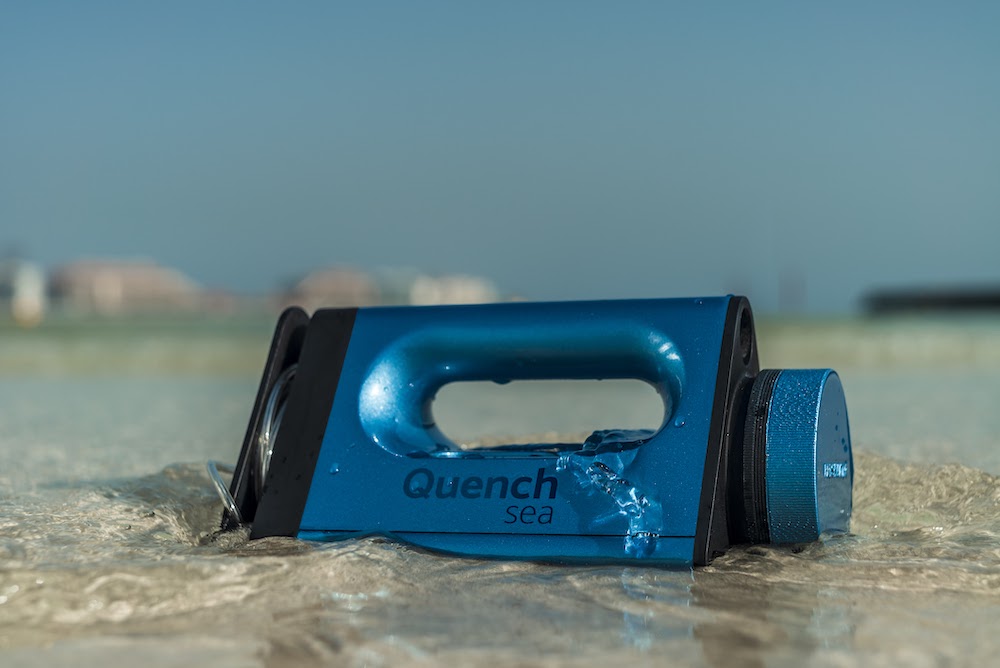
So, there’s a brand new tool out that will help millions of people around the world. It’s called Quench Sea and it will offers adventurers desalination on-the-go. As well as helping adventurers get clean water, it can also help lots of people around the world currently in crises. QuenchSea is groundbreaking and an affordable device that will help turn seawater into fresh drinking water.

It costs as little as £47 and is portable, handheld and will turn seawater into fresh drinking water. It weighs less than bag of sugar and will be available at a special reduced price for the first 30 days of sale from Indiegogo.

Quench Sea is London based and is the world’s only low cost portable seawater desalination device. It is ideal for outdoor enthusiasts such as sailors, campers, survivalists and travellers. The Quench Sea is capable of making up to 2L of palatable water per hour. It’s achieved through a manual handle powered unit which fits into a small bag. While delivery of the product is expected in 2021.

Quench Sea – How It Works

So, it is an affordable, convenient and safe alternative to boiling seawater. All users have to simply pump it for as long as they need to provide the volume of clean water they want. Quench Sea is hard wearing and reusable. While it is only the filters that need to be replaced (While time period varies due to usage)

The Quench Sea will also help save the lives of others with every order. The company behind Quench Sea pledge that every unit sold will donate an additional device to humanitarian water aid partners. As part of it’s ambitious vision to solve the global water crisis.

Lee King, CEO of Hydro Wind Energy, the company behind Quench Sea said:

‘Whilst Quench Sea is the product of hundreds of thousands of hours developing solutions to help solve the world’s water crisis, we soon realised that its weight, dimensions and cost also make it an ideal product for the adventurer market.’ 

Key features include:

  • A glass of water in just 5 minutes

  • Filters out salt, microbes (bacteria and viruses) and microplastics

  • Easy to carry, lightweight (600g – confirm – <1KG)

  • Size of a conventional iron – should fit in a backpack/rucksack

  • Hand operated, no batteries, no electricity

  • Guaranteed 2 Liters per hour (but up to to 3 in optimal conditions)

  • Super cheap membrane replacement = $10 (hopefully recyclable)

  • Springwater taste achieved with activated charcoal

  • Rich in healthy minerals

  • Minimum equivalent 8 Glasses of water per hour (8 x 240ml = 1,920ml or 1.9 litres)

  • The membrane has a lifetime depending on different influence factors such as pressure, throughput and the quality of water. Membrane specifications say it can last up to 1 year or 18,000 litre

  • Integrated water storage/container and cup

How it works:

Quench Sea is a device that combines a hydraulic system, triple pre-filtration and a small reverse osmosis membrane to desalinate seawater into freshwater using manual human power. At sea or on the coast, it converts seawater into clean fresh drinking water instantly.

Quench Sea has an inbuilt ultrafiltration and microfiltration system to remove suspended solids, bacteria, viruses, parasites and microplastics. The first sediment filtration removes the most damaging sediments and particles. Seawater is then forced under pressure through a 0.01 micron membrane removing all contaminants before the final reverse osmosis process.

PreviousNext
123

So, keep up to date with everything How To Kill An Hour by signing up to our newsletter by clicking here!

Also, let us know what you think of the show by clicking here!

Click here to subscribe to our YouTube Channel to see more amazing ways to kill time!

While you are there follow us on Twitch by clicking here!

https://wp.freedomhost.uk/howtokillanhour/wp-content/uploads/sites/65/2020/06/01-1-1.jpg 668 1000 billywright http://wp.freedomofcreation.co.uk/howtokillanhour/wp-content/uploads/sites/65/2017/09/htkah-web-logo-2017.png billywright2020-06-23 14:42:272020-06-24 14:18:48Quench Sea
Page 14 of 87«‹1213141516›»

Sign up to our Mailing List

Latest Posts

  • How to Buy Your First Car Without the Regrets24th September 2025 - 5:12 pm
  • PCP Finance Pitfalls: What Gamers and Creators Should Know Before Signing the Deal3rd September 2025 - 5:05 pm
  • Nintendo Switch 2 Review: Better late than never!28th July 2025 - 4:28 pm
  • The Mighty 2025 Ford Ranger PHEV: The Plug-In Pickup That Powers Through Work & Play19th June 2025 - 3:55 pm
  • The New Toyota Aygo X Hybrid: A Tiny Urban SUV That’s Big on Fun, Green on Footprint3rd June 2025 - 12:01 am
  • 🚗 “Next-Gen Beast Mode: The 2025 Toyota RAV4 Gets Smarter, Greener & Meaner21st May 2025 - 4:13 pm
  • Lexus Levels Up: The All-New ES is Sleek, Smart, and Seriously Electrified21st May 2025 - 9:00 am
  • 🚙 “Toyota’s Electric Adventure Wagon: Meet the All-New bZ4X Touring – Built for Families, Powered for the Wild”20th May 2025 - 2:57 pm
  • Exposing the Myths Around Car Finance Claims6th May 2025 - 2:05 pm
  • Keep It Fresh: Meet B!POD’s DRO!D – The Ultimate Food Vacuum System1st March 2025 - 1:50 pm
  • Should You Buy A New Or Used Car?24th February 2025 - 10:33 pm
  • Transform Your Tap: Dive into the Water2 Pod 2.0 Starter Kit24th December 2024 - 3:34 pm
  • Ultimate Ears MINIROLL: The Mighty Mini Speaker for Your Adventures20th December 2024 - 5:57 pm
  • HyperX Pulsefire Haste 2 Wireless Gaming Mouse: Elevate Your Game with Featherlight Precision19th December 2024 - 5:05 pm
  • Tune In with Style: House of Marley’s Zion True Wireless Earbuds18th December 2024 - 7:37 pm
  • Krafted Connex: The Swiss Army Knife of Device Connectivity18th December 2024 - 7:11 pm
  • BrewDog’s 12 Cocktails of Christmas14th December 2024 - 3:58 pm
  • Legee D8 and Lulu: The Ultimate Cleaning Duo That Makes Life Easier13th October 2024 - 10:54 am
  • The Future of Sustainable Mobility: A Journey Through Toyota’s 6 Part Vision2nd October 2024 - 5:44 am
  • Slice Like a Samurai: TOG Knives – The Ultimate Fusion of Tradition and Technology20th August 2024 - 5:49 pm

Archives

© Copyright - How to Kill an Hour 2017 - Designed By Freedom of Creation ----- Website Privacy Policy
  • X
  • Facebook
  • Instagram
Scroll to top